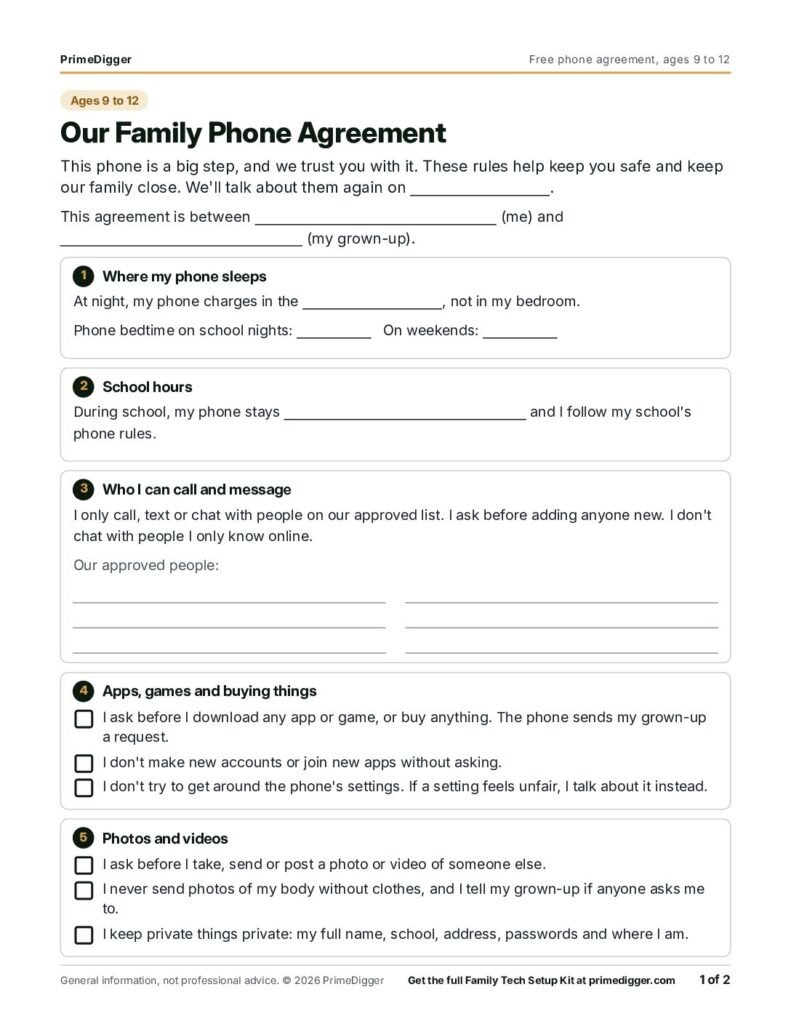
A phone contract for kids is a short, written agreement between you and your child. It lists the phone rules, what happens when a rule is broken, and what you promise in return. This guide gives you a free 2-page template, rules sorted by age, and a simple way to agree on them together.
We built it from guidance by the American Academy of Pediatrics (AAP) and Common Sense Media, plus Apple’s and Google’s own parental control help pages. Every source is linked where we use it and listed at the end.
Quick answer
- What it is: a one-page family agreement about phone use. It is not a legal document.
- What goes in it: when and where the phone is used, which apps are allowed, safety and privacy rules, what happens if a rule is broken, and what the parent promises.
- How to use it: write it together, sign it, set up the phone’s parental controls to match, and review it every few months.
- Best timing: before your child gets the phone. Changing rules later is harder.
Why a phone contract works
A first phone brings a lot of small decisions. Can it come to the dinner table? Who can your child text? What about a new app a friend recommends? Without a written plan, each question turns into a new argument.
A written agreement settles those questions once. Both experts we relied on recommend this approach. The AAP offers a free, interactive Family Media Plan so families can set shared rules in writing. Common Sense Media publishes a Family Media Agreement built on the same idea.
Three things make a contract work better than verbal rules:
- It is clear. Everyone knows the rules before the phone arrives.
- It is shared. Common Sense advises including kids in setting the rules. With tweens and teens, it suggests explaining your concerns first so the rules feel fair (Common Sense Media).
- It goes both ways. The Common Sense agreement includes promises from parents too, such as talking through a request before saying no.
A contract is also a readiness test. Common Sense says there is no single “right” age for a phone. It points to maturity and responsibility instead, such as following rules and doing homework or chores without constant reminders (Common Sense Media). If your child can’t agree to a simple contract, that tells you something.
What to include in a phone contract for kids
Keep it to one page. Use short “I will” sentences, like the Common Sense agreement does. Here are the sections we suggest, with sample lines you can copy.
| Section | What it covers | Sample line |
|---|---|---|
| When and where | Phone-free times and places | “I will keep my phone away during meals and homework.” |
| Bedtime | Where the phone sleeps | “I will charge my phone in the kitchen, starting one hour before bed.” |
| Apps and downloads | Who approves new apps and games | “I will ask before I download any app, even a free one.” |
| Contacts and messages | Who your child can talk to | “I will only text and call people I know in real life.” |
| Safety and privacy | Personal info, location, strangers | “I will not share my address, school or passwords online.” |
| Kindness | How to treat others online | “I will not send anything I wouldn’t say to someone’s face.” |
| Speaking up | What to do when something feels wrong | “I will tell a parent if I see something that upsets me. I won’t be punished for telling.” |
| Care and cost | Damage, loss, extra charges | “I will tell my family right away if my phone is lost or broken.” |
| Parent access | Passcodes and check-ins | “My parent will know my passcode. Phone checks will happen together.” |
| If a rule is broken | Agreed consequences | “If I break a rule, the consequence is listed below, and we will talk first.” |
| Parent promises | What the adult agrees to | “I will listen before I say no and put my own phone away at dinner.” |
| Review date | When the rules get updated | “We will review this contract on: ____.” |
The bedtime line follows the AAP. Its guidance says to avoid screens for an hour before bed and to keep devices out of bedrooms. It also suggests phone-free times at meals and during homework (HealthyChildren.org).
Phone rules by age
Rules should loosen as your child shows they can handle more. The table below is a starting point, not a rulebook. Adjust it to your child, not to the calendar.
| Age | Phone and apps | Time and place | Privacy and oversight |
|---|---|---|---|
| 8–10 | A basic phone or a smartwatch with calling. Parent installs every app. No social media. | Used in shared rooms only. Off at a set time. Charges outside the bedroom. | Parent knows the passcode. Location sharing on. Contacts approved by a parent. |
| 11–12 | A first smartphone with full parental controls. Every download needs approval. No social media accounts yet. | Downtime on school nights. No phone during homework or meals. | Regular check-ins, agreed in advance. Group chats only with known friends. |
| 13–15 | Social apps one at a time, set to private. Review settings together first. | Downtime still on. Your teen helps choose the hours. | Fewer checks, more conversation. Parent still knows the passcode. |
| 16–17 | Teen chooses most apps. Clear rule: no phone use while driving. | Teen manages daily time. Phone still sleeps outside the bedroom. | Privacy grows. Location sharing by agreement. Check-ins replace spot checks. |
A few notes on the table:
- Starting simple. Common Sense suggests a basic phone or smartwatch before a smartphone. It notes many experts recommend waiting until 13 or older for a smartphone (Common Sense Media). For device picks, see our guide to the best phone for kids.
- Social media and 13. Most major social apps set 13 as their minimum age. Common Sense covers the trade-offs of starting earlier in its guide to social media before 13.
- Teens. A phone contract for teens should feel less like a list of bans and more like a plan you both own. Give your teen a real say in the hours and the consequences.
How to agree on the contract together
A contract your child helped write is a contract your child is more likely to follow. Here is a simple process.
- Pick a calm moment. Not right after a fight about screens. A weekend afternoon works well.
- Explain your reasons. Share why sleep, homework and safety matter to you. Kids accept rules better when they understand them.
- Ask for their ideas first. Ask what rules they think are fair. You may be surprised how strict they are.
- Agree on a few must-haves. Safety rules are not up for debate. Times and some apps can be.
- Write the consequences down now. Deciding them in advance takes the anger out of it later.
- Sign it, both of you. Then put it somewhere you will both see it, like the fridge.
- Set a review date. The AAP suggests revisiting your family media plan from time to time, such as at the start of a school year (HealthyChildren.org).
Model the rules yourself. If phones stay off the dinner table, yours does too. The AAP plan is designed for the whole family, not just the kids.
What to do when rules get broken
Rules will get broken. That is normal, and it is part of learning. What matters is how you respond.
- Talk first. Ask what happened before you decide anything. Sometimes a rule was unclear.
- Use the consequence you agreed on. Don’t invent a new one in the moment. That is the whole point of writing it down.
- Match the consequence to the rule. Phone in the bedroom at night? The phone charges in your room for a week. Downloaded an app without asking? App approvals get stricter for a while.
- Keep it short. A clear end date gives your child a way to earn trust back.
- Never punish honesty. If your child tells you about a scary message or a mistake, thank them. Taking the phone away for speaking up teaches them to stay quiet next time.
What if they need the phone for school or the ride home? Keep the access your child needs for the trip, schoolwork or contacting a trusted adult. You can pause the app tied to the broken rule or have the phone charge outside the bedroom at night. Agree on when normal access returns, then check that essential calls and messages still work with the limits in place.
If the same rule keeps breaking, look at the rule. It may be too strict for your child’s age. Or the phone settings may not back it up.
Pair the contract with phone settings
A contract sets expectations. Phone settings make them easier to keep. Each rule in your contract should have a matching setting where one exists.
| Contract rule | iPhone (Screen Time) | Android (Google Family Link) |
|---|---|---|
| Phone off at bedtime | Screen Time Schedule (old name: Downtime) | Bedtime / Downtime |
| Ask before downloading | Ask to Buy | Require approval for Play apps |
| Only known contacts | Allowed Contacts (old name: Communication Limits) | Manage contacts and app limits |
| Daily time limit | Time Allowances (old name: App Limits) | Daily limit |
| Location sharing | Find My via Family Sharing | Location in Family Link |
On iPhone with iOS 27, all of these live under Settings, Family, then your child’s name. Apple notes that in some regions Ask to Buy is on by default and can’t be turned off for children under 18. Allowed Contacts lets you limit who can call, FaceTime and message your child; just make sure emergency contacts stay reachable. Our step-by-step guide shows how to set up parental controls on iPhone, including the new menu names.
On Android, Google Family Link lets parents set daily limits and a bedtime, approve Play Store apps and see the device’s location (Google For Families Help). Google notes that most Family Link tools do not work on iPhones or iPads.
If you want more than the built-in tools, compare options in our guide to the best parental control apps.
Family Tech Setup Kit
Want the full set? Our printable kit adds a teen phone agreement (13 to 17), a games and console agreement, and one-page setup checklists for iPhone, Android, PS5, Xbox, Switch, Roblox, Fortnite, Minecraft and Instagram.
Frequently Asked Questions
What age should a child get a phone contract?
Use one with your child’s first phone or smartwatch, at any age. Kids as young as 8 can follow a simple version. The rules then grow with them.
What should a phone contract for teens include?
The same core sections as a kids’ contract: time, apps, safety, kindness and consequences. Add rules for social media privacy and no phone use while driving. Give your teen more say in the hours and the consequences.
Is a phone contract legally binding?
No. It is a family agreement, not a legal contract. Its power comes from writing the rules down and agreeing on them together.
Should parents follow the contract too?
Yes. Add a parent promises section. The Common Sense Family Media Agreement includes promises from parents, and the AAP Family Media Plan is meant for the whole family.
How often should we update the phone contract?
Review it every few months and at big moments, like a birthday or the start of a school year. The AAP recommends revisiting your family media plan from time to time.
Can a phone contract replace parental controls?
No. The contract sets the rules, and parental controls help enforce them. Use both. Settings like Screen Time Schedule and app approvals turn your written rules into defaults.
Sources
All sources checked November 2026.
- American Academy of Pediatrics, Family Media Plan (HealthyChildren.org).
- American Academy of Pediatrics, How to Make a Family Media Plan (HealthyChildren.org).
- American Academy of Pediatrics, Helping Kids Thrive in a Digital World: AAP Policy Explained (HealthyChildren.org).
- Common Sense Media, Family Media Agreement (PDF).
- Common Sense Media, Parents’ Ultimate Guide to First Phones.
- Common Sense Media, What’s the best way to manage screen time?
- Common Sense Media, Should I let my kid get social media before they’re 13?
- Apple Support, Use Screen Time to manage your child’s iPhone or iPad.
- Google For Families Help, Get started with Family Link.