

Reader-supported: we may earn a commission from links on this page. This study has no sponsor, and no product maker reviewed it before publication.
Apple says a MacBook camera cover should be no thicker than 0.1 mm, about one sheet of printer paper. We wanted to know how many of the covers people actually buy meet that limit. So on October 9, 2026, we went through the top 30 of the Camera Privacy Covers best-seller list at the largest US online store and recorded the thickness each seller states.
Key findings
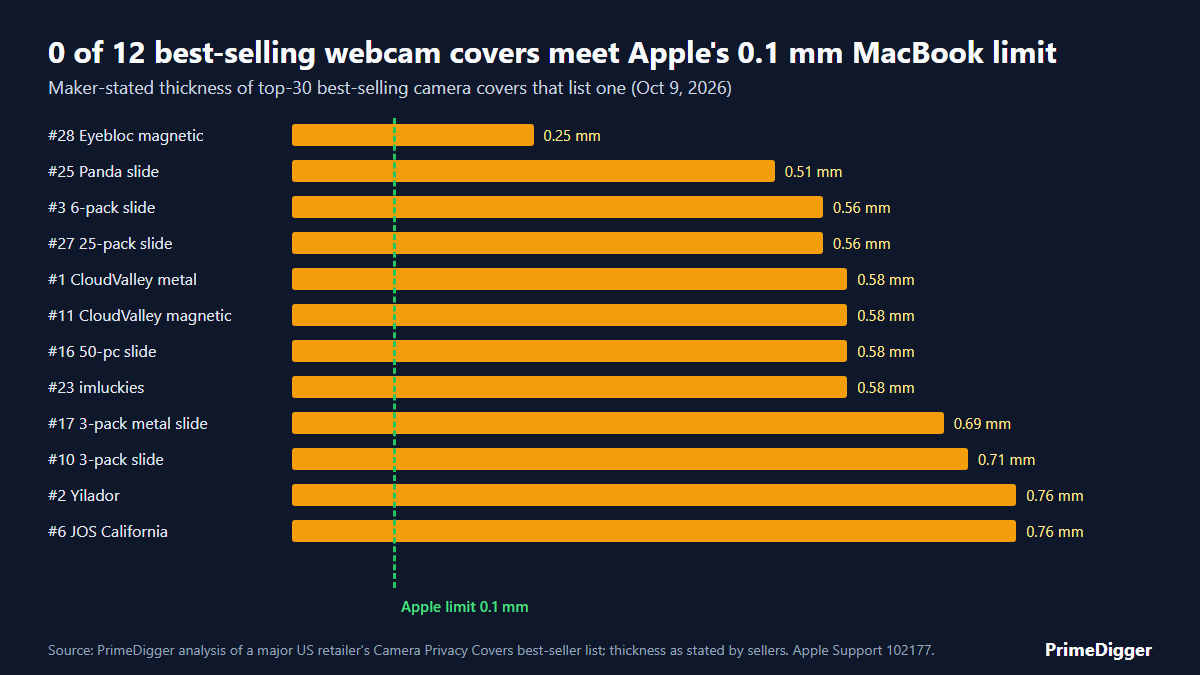
- 0 of 12 best-selling covers that list a thickness meet Apple’s 0.1 mm limit.
- The stated thicknesses run from 0.25 mm to 0.76 mm, or 2.5 to 7.6 times Apple’s limit. The median is 0.58 mm, nearly 6 times the limit.
- 28 of the top 30 are laptop or computer covers. 17 of those 28 don’t state a thickness in the product title (one of them, Eyebloc, gives it further down the listing), so most buyers can’t easily check them against Apple’s rule.
- 3 listings suggest you can close the lid with the cover on. Apple says to remove any cover thicker than 0.1 mm before closing.
What Apple Says
In its support article “Don’t close your MacBook, MacBook Air, or MacBook Pro with a cover over the camera”, Apple warns that closing a Mac laptop with a camera cover on it might damage the display. Its advice, if you must use a cover:
- Make sure the cover is not thicker than an average piece of printer paper (0.1 mm).
- Avoid covers that leave adhesive residue.
- If the cover is thicker than 0.1 mm, remove it before closing your computer.
Apple also notes that a cover can interfere with the ambient light sensor next to the camera. That sensor drives features like automatic brightness.
The Data: 12 Covers That List a Thickness
| List rank | Product (as listed) | Type | Stated thickness | In mm | vs Apple’s 0.1 mm |
|---|---|---|---|---|---|
| #1 | CloudValley Metal Slide (2-pack) | Metal slide | 0.023 in | 0.58 mm | 5.8x |
| #2 | Yilador Webcam Cover (3-pack) | Slide | 0.03 in | 0.76 mm | 7.6x |
| #3 | Laptop Camera Cover Slide (6-pack, no brand in title) | Slide | 0.022 in | 0.56 mm | 5.6x |
| #6 | JOS California (9-pack) | Slide | 0.03 in | 0.76 mm | 7.6x |
| #10 | Camera Cover Slide (3-pack, no brand in title) | Slide | 0.028 in | 0.71 mm | 7.1x |
| #11 | CloudValley Upgrade Magnetic (2-pack) | Magnetic slide | 0.023 in | 0.58 mm | 5.8x |
| #16 | Webcam Cover Slide (50 pcs) | Slide | 0.023 in | 0.58 mm | 5.8x |
| #17 | Webcam Cover Slide, metal (3-pack) | Metal slide | 0.027 in | 0.69 mm | 6.9x |
| #23 | imluckies Laptop Camera Cover Slide (2-pack) | Slide | 0.023 in | 0.58 mm | 5.8x |
| #25 | Cute Panda Camera Cover Slide | Slide | 0.02 in | 0.51 mm | 5.1x |
| #27 | Laptop Camera Cover Slide (25-pack) | Slide | 0.022 in | 0.56 mm | 5.6x |
| #28 | Eyebloc Magnetic Webcam Cover Slide | Magnetic slide | 0.01 in | 0.25 mm | 2.5x |
Covers marketed as “ultra-thin” are thin compared with old plastic sliders, not compared with Apple’s limit. The thinnest one that lists a number, the Eyebloc at 0.01 inch, is still 2.5 times Apple’s 0.1 mm.
What the Listings Say About Closing the Lid
Some sellers go further than “thin” and suggest the lid can close safely with the cover on:
- CloudValley (#1): the listing says its 0.023-inch cover “does not interfere with closing your laptop.”
- Eyebloc (#28): the listing says its 0.01-inch cover lets the laptop “close securely without damaging the screen.”
- MESMOS (#5): the listing gives no number but says the sliders are thin enough to close your laptop “nice & snug.”
By Apple’s own guidance, each of these covers should come off before you close a MacBook. One listing got it right: the Gadget Ray clip-on cover (#15) says it is designed to be used while your laptop is open.
Why It Matters
A MacBook’s screen closes very close to the keyboard. Apple says this clearance is designed to tight tolerances, so even a small bump at the camera can press on the glass. Apple published this warning in 2020, when owners were reporting cracked displays, as AppleInsider covered at the time. Display repairs are expensive, and a cover that costs a few dollars isn’t worth that risk.
What to Do Instead
- On a MacBook, rely on the green light. Apple says the camera indicator light glows green whenever the camera is on. You can also turn camera access off for any app in System Settings > Privacy & Security > Camera.
- If your workplace requires a cover, choose one that states 0.1 mm or less and won’t leave residue. If no thickness is listed, treat it as too thick.
- If you already use a slider, slide it off before you close the lid, every time.
- On other laptops, check your maker’s guidance. Apple’s 0.1 mm figure applies to Mac laptops, and other brands may have different clearances.
For picks and free options, see our guide to the best laptop camera covers.
A camera cover only blocks the camera. If you work in public, people next to you can still read your screen, so see our guide to the best laptop privacy screen too, including which ones fit a MacBook.
How We Did This
- On October 9, 2026, we recorded the top 30 products in the Camera Privacy Covers best-seller list of the largest US online store.
- We left out 2 products that are not laptop covers: a cover for an external Logitech webcam and a front-camera cover for an iPhone. That leaves 28.
- We recorded the thickness each seller states in the product title. We also opened 6 listings to read the bullet points: Eyebloc listed 0.01 inch there. The other 5 either repeated the title figure or gave no thickness for the cover itself.
- We converted inches to millimeters (1 inch = 25.4 mm) and compared each one with Apple’s 0.1 mm guidance.
- Limits: we did not measure the covers ourselves. These are the sellers’ own numbers, and real thickness can differ. Best-seller rankings change often, so a later check may show different products.
Use This Data
Journalists, teachers and IT teams are welcome to use the chart and table. Please credit PrimeDigger and link to this page. Suggested citation: “PrimeDigger, Webcam Cover Thickness Study, October 2026.” Questions or corrections: contact@primedigger.com.
Frequently Asked Questions
How thick should a webcam cover be for a MacBook?
Apple says a camera cover should be no thicker than an average piece of printer paper, which it puts at 0.1 mm, and should not leave adhesive residue. If a cover is thicker than 0.1 mm, Apple says to remove it before you close the laptop.
Are slide webcam covers safe for MacBooks?
Not if you close the lid with them on. In our check, every best-selling slide cover that lists a thickness was between 0.25 mm and 0.76 mm, which is 2.5 to 7.6 times Apple’s limit. Slide it off before closing, or rely on the green camera light and camera permissions instead.
Is 0.023 inch thin enough for a MacBook?
No. 0.023 inch is about 0.58 mm, nearly six times Apple’s 0.1 mm guidance. Many listings call this “ultra-thin”, but it is thin compared with old plastic sliders, not compared with Apple’s limit.
Sources
- Apple Support: Don’t close your MacBook, MacBook Air, or MacBook Pro with a cover over the camera
- Camera Privacy Covers best-seller list (viewed Oct 9, 2026)
- AppleInsider: Apple advises against MacBook camera covers due to display cracking (July 2020)


